
Blue Letter Bible
Blue Letter BibleBooks & Reference
4.66.29K Reviews
- Version
- 1.87.22 build 2122
- Installs
- 1.00M
- Age Rating
- Everyone
Screenshots
Our Review of Blue Letter Bible
 Analysis by Appyee
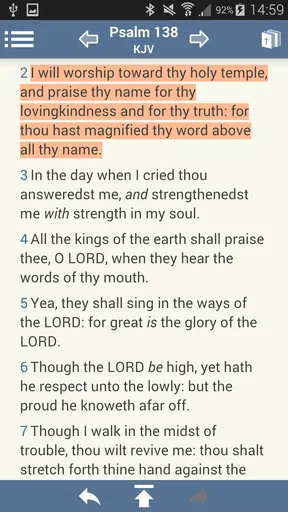
I found Blue Letter Bible most useful when I stopped treating it as just another way to read a Bible and started using it as a shared study reference. On a household tablet, one person can read a passage in the morning, another can check a word later, and someone else can return to the same chapter for a small-group discussion. That flexibility is the app’s real appeal: it brings reading and study tools together without charging for access.
This is a free Books & Reference app from Blue Letter Bible, available for Android devices running Android 8.0 or later. It is rated for Everyone, has passed one million installs, and holds a 4.6 average from roughly nineteen thousand ratings. Those figures suggest a mature, widely used reader rather than an experimental niche tool. I also noticed that its current version is 1.87.00 build 2098, so users with an older phone should check compatibility before planning to use it on a spare household device.
Using it together at home without losing the study focus
My favorite shared-use situation is a quiet evening when several people are looking at the same passage for different reasons. One reader may want a straightforward text view, while another wants help understanding a word or comparing the surrounding verses. Instead of passing around a printed Bible and a separate reference book, the app gives everyone a common starting point.
That does not mean it replaces conversation. In fact, the app works best when it supports conversation rather than trying to lead it. I would open the passage first, read it without touching the study tools, and only then investigate a phrase that caused confusion. This simple order matters because the extra material can easily pull attention away from the main text.
For a household with children, teenagers, and adults, the Everyone rating makes the app easy to consider as a general reading tool. Still, an age rating is not the same as a teaching plan. Younger readers may need an adult to explain vocabulary, historical context, or why different interpretations exist. I would use the app as a shared reference, not hand it over as an automatic substitute for guidance.
A practical routine is to choose one passage before opening the app, assign each person a question, and use the study material only to investigate those questions. One person can look at a difficult term, another can trace the surrounding argument, and a third can read the passage aloud. This keeps the device from becoming the center of the session.
What the first setup feels like
The initial experience is relatively approachable because the core purpose is clear: find a passage, read it, and use linked study tools when needed. I did not need to understand a complicated research system before beginning. That makes the app suitable for a family member who simply wants a Bible reader, while still leaving room for someone more curious to explore.
The important boundary is deciding what each person expects from the app. A casual reader may want a clean reading session and nothing more. A student may want to examine language and supporting material. If both people share a device, agreeing on that difference prevents frustration. The student should not assume every reader wants a deep research session, and the casual reader should not dismiss the additional tools as unnecessary clutter.
I recommend starting with the simplest possible workflow: open a familiar book, read a short section, and test one linked study option. That gives you a feel for the navigation before a group session. It also helps reveal whether the app’s depth suits your household or whether a simpler reader would be more comfortable for everyday reading.
Because this is a study-focused app, the interface can feel busier than a minimal Bible reader. That is a fair trade-off. The value comes from having reference material close to the verse, but the same closeness can interrupt a reflective reading habit. I would not judge it negatively for that; I would simply use it differently depending on the moment.
Keeping personal boundaries on a shared device
Shared-device use deserves a little planning. I would not assume that every setting, reading position, or personal note belongs to everyone in the home. If several people use the same tablet, establish a simple rule: the person who opens the app returns it to the main passage when finished, rather than leaving a private study trail on screen.
This is especially useful when a parent and child use the same device. The child can explore a passage with an adult nearby, while the adult avoids treating every search as something to inspect. Trust works better when the app is used openly and the boundaries are stated beforehand. The application can provide access to study material, but it cannot create a family agreement for you.
I would also separate household coordination from account assumptions. If you need everyone to follow the same reading plan or remember the same discussion point, write that plan somewhere the household already uses. Do not rely on a shared app session to communicate responsibilities. The Bible reader can be the common reference, while a calendar, message, or paper note handles who is reading what.
That approach prevents a common mistake: expecting one device to manage reading, teaching, scheduling, and personal privacy at the same time. Blue Letter Bible is strongest at reading and study. It is not the place I would build an entire household organization system around.
Why the linked study approach is genuinely useful
The strongest feature in my experience is the connection between a verse and the tools that help explain it. When I encounter an unfamiliar expression, I can investigate it from the passage instead of leaving the app to search the web. That reduces the friction between noticing a question and beginning to answer it.
A useful technique is to read a complete paragraph before opening any reference material. Then return to the specific verse and ask what kind of help you actually need. Is the problem a word, the meaning of a sentence, or the larger context? This prevents random browsing and makes the tools more purposeful.
Another non-obvious advantage is that the app can serve different skill levels in the same conversation. A beginner can remain in the reader, while a more experienced student checks a linked resource. Both people are still working from the same verse. In a household or small group, that shared anchor is more valuable than giving everyone separate articles to read.
The trade-off is that study links encourage curiosity, and curiosity can become distraction. I have had better results by limiting myself to one question per reading session. If five questions appear, I note the others for later rather than opening every available reference immediately. This keeps the app from turning a short reading into an unfocused research spiral.
Coordinating reading without pretending the app is a family manager
For coordinated use, I would create a very small routine. Choose a passage, decide whether the session is devotional or investigative, and agree on one question to revisit. The app handles the text and study process; the household handles the schedule and discussion. That division of labor is simple, but it avoids expecting features that a Bible reader does not need to provide.
On a shared phone, coordination may mean taking turns. On a tablet in a common room, it may mean leaving the app open to the selected passage for the next person. Either way, the best habit is to say aloud what you found useful. A family member who only sees a screen full of references may not understand why the tool matters. A short explanation makes the shared session more welcoming.
I would also avoid turning every use into a group activity. Some people need quiet reading time, and others enjoy discussion. Since the app serves both a basic reader and a deeper study workflow, it can fit either preference, but the household should respect the difference. A teenager researching a passage may need concentration, while a younger child may benefit more from reading aloud with an adult.
For a study group, the app is helpful as a common reference point, but I would still communicate the passage in advance. Asking everyone to discover the navigation during the meeting wastes time. If the group has a shared device, one person can operate it while others discuss. If everyone has a phone, each person can investigate privately, though that may make the conversation less visually connected.
Age, trust, and the limits of a general content rating
The Everyone rating makes Blue Letter Bible broadly approachable, but households should still think about maturity and supervision in practical terms. Religious texts can contain difficult subjects, unfamiliar cultural references, and language that younger readers may not understand. The app’s rating does not remove the need for an adult to frame those topics appropriately.
I especially recommend guided use for children who are new to Bible reading. Start with a short passage and ask what they noticed before opening study tools. If a difficult term appears, investigate it together. This turns the app into a learning aid instead of a screen that supplies unexplained answers.
For teenagers, the app can be more valuable as an independent reference. They can read a passage, identify a question, and use the linked tools to begin research. I would encourage them to distinguish between the biblical text and someone’s explanation of it. That habit is important because reference material can illuminate a passage without settling every interpretive disagreement.
Adults may appreciate the depth, but they also need to be honest about their own preferences. Someone who wants a distraction-free devotional reader may find the study options more than they need. Someone preparing a lesson or trying to understand a difficult verse may consider those same options the reason to choose this app over a basic alternative.
How it compares with simpler readers and larger study platforms
Compared with a plain Bible reader, Blue Letter Bible offers more immediate investigation. A minimal reader usually wins when the goal is speed, calm, and a clean screen. I would choose that kind of app for a short morning reading where I do not want to follow links or examine terminology.
Compared with a broad research platform, this app feels more focused. Large study suites may include extensive libraries, elaborate note systems, or tools aimed at formal academic work. Those services can be better for someone building a long-term research archive. Blue Letter Bible is a better fit when you want study help connected closely to the passage without turning the entire experience into a major software project.
The free price is another meaningful advantage for households. A family can try the reader and its study approach without first deciding whether a subscription is worthwhile. That lowers the barrier for a shared device or a relative who is curious but not ready to invest in specialized study software.
Free also means I would set expectations carefully. If you want a polished personal knowledge-management system, detailed collaboration, or a complete academic library, this may not be your final tool. It is most convincing as a Bible reader with study support, not as an all-purpose replacement for every reference resource.
Small habits that make the app work better
My first tip is to use the app in two modes. In reading mode, stay with the passage and resist opening every reference. In study mode, return to one verse and investigate a specific question. Naming the mode in your head sounds minor, but it keeps the experience from becoming either too shallow or too scattered.
My second tip is to use a shared device as a discussion object rather than a personal diary. Put it in the middle during a family session, read from it, and explain why you are opening a tool. This makes the screen accessible without assuming that everyone wants their individual study habits exposed.
My third tip is to compare an explanation with the surrounding passage before accepting it. A linked resource can be useful, but the verse should not be isolated from its paragraph or chapter. I found that reading the nearby context first often changes the question I thought I needed to ask.
My fourth tip is to give beginners permission not to use the advanced material. The app does not become more valuable merely because every tool is opened. For a new reader, a successful session may be finding a passage and understanding one idea. Depth should be available, not compulsory.
One limitation I would mention to prospective users is the learning curve created by that depth. The app is easy to begin, but becoming comfortable with its study workflow takes experimentation. A person who wants instant simplicity may prefer a basic reader. I would not install it on a shared household device and expect everyone to enjoy it in the same way from the first session.
Who should install it, and who should choose something else?
I recommend Blue Letter Bible to readers who want more than scrolling through a digital text. It is particularly suitable for someone who regularly asks why a verse is phrased a certain way, wants study help close to the passage, or shares reading time with people at different levels of experience.
It is also a sensible choice for a household that wants one free reference app available to adults and children, provided an adult supplies the context and the family agrees on shared-device boundaries. The Everyone rating helps with broad access, while the study depth gives older readers somewhere to go when a simple reading raises a harder question.
I would skip it if your priority is a completely uncluttered devotional experience, a dedicated collaborative reading system, or a full academic research environment. In those cases, a simpler reader or a more specialized study platform may suit you better. The right choice depends less on how many tools an app has and more on whether you will use those tools deliberately.
My household verdict
After using it as both a personal reader and a shared reference, I see Blue Letter Bible as a strong middle ground. It is approachable enough for ordinary reading, yet its verse-linked study tools give it a purpose beyond displaying text. The free price makes experimentation easy, and its broad age rating supports household access, though neither feature replaces thoughtful supervision or clear agreements about shared devices.
The app earns its place when a family wants to read the same passage and let each person go a little deeper in a different way. It is less convincing when the goal is silent simplicity or advanced personal research management. I would begin with one passage, one question, and one short session. If that workflow feels natural, the app can become a dependable study companion rather than another unused icon.
For me, the final recommendation is positive with one condition: use the depth intentionally. The best experience comes from keeping the passage central, using the linked tools to answer real questions, and treating household coordination as a human responsibility rather than an app feature. With that mindset, Blue Letter Bible is a thoughtful free choice for readers who want their digital Bible to support both everyday reading and serious curiosity.
Privacy and Permissions
See what permissions an app requests and how it handles your data.
- Other
- view network connections, pair with Bluetooth devices, full network access, run at startup, prevent device from sleeping
Verdict
Strengths of Blue Letter Bible
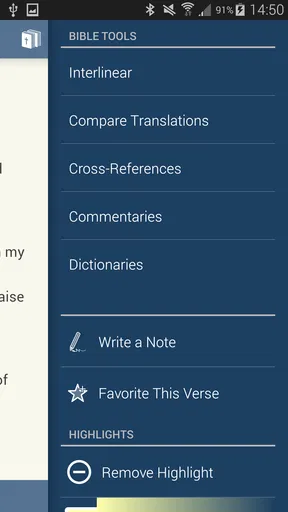
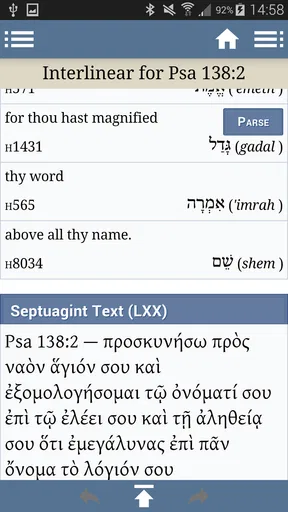
- Detailed study tools, including commentaries, dictionaries, and original-language resources.
- Audio Bible options make it convenient to listen while commuting or multitasking.
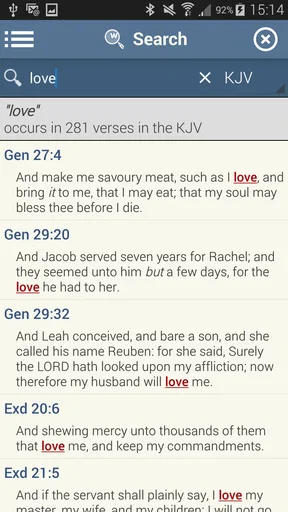
- Strong search features help locate verses, topics, and specific words quickly.
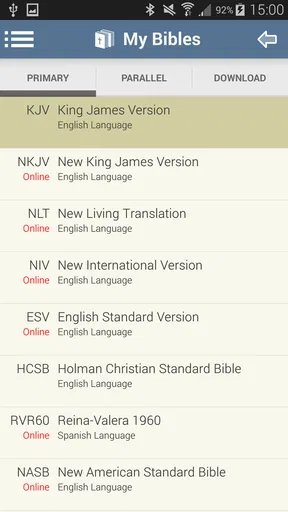
- Parallel Bible views allow easy comparison of multiple translations.
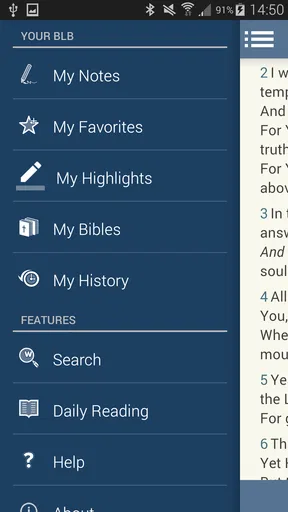
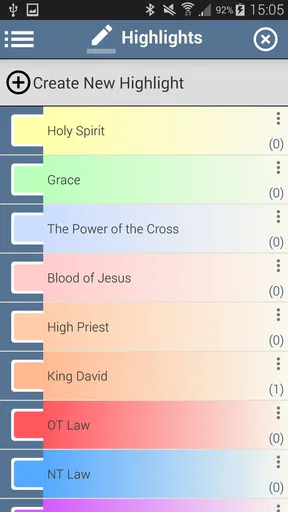
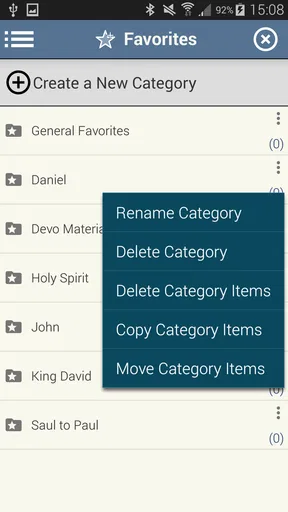
- Personal notes, highlights, and bookmarks help organize ongoing Bible study.
Limitations of Blue Letter Bible
- The large number of tools can feel overwhelming for first-time users.
- Some study resources may require extra downloads or an internet connection.
- The interface feels more functional than modern compared with newer Bible apps.
- Audio playback and resource loading can vary depending on device and connection.
- Advanced features may take time to discover without exploring the menus.
Similar Picks in This Category
View All
Google Play Books & Audiobooks
Google LLC4.7

네이버 - NAVER
NAVER Corp.3.5

Wattpad - Read & Write Stories
Wattpad.com3.7

King James Bible - Verse+Audio
Ozion4.8

Bible Offline-KJV Holy Bible
Bíblia Offline4.9

Amazon Kindle: Reading App
Amazon Mobile LLC4.8
Frequently Asked Questions
What is Blue Letter Bible, and what can I use it for?
Blue Letter Bible is a Bible study app designed for reading Scripture, comparing translations, and exploring additional study resources. During testing, its strongest features included verse search, commentaries, dictionaries, concordances, maps, and original-language tools. It is useful for personal devotion, sermon preparation, group study, or anyone who wants more context than a standard Bible-reading app provides.
Is Blue Letter Bible free to download and use?
Yes, Blue Letter Bible is generally available as a free app, and many of its main Bible-reading and study tools can be used without payment. Some resources or features may vary depending on licensing, platform, or future updates. Users should also remember that downloading the app may be free while internet access, optional donations, or external purchases could still involve separate costs.
Does Blue Letter Bible work offline?
Blue Letter Bible offers access to a substantial amount of content, but offline availability can depend on the specific Bible version or study resource. Some materials may need to be downloaded first, while others require an internet connection. Before traveling or studying without reliable service, open the desired translation and resources in advance and check whether they remain accessible offline.
Which Bible translations and study resources are included?
The app provides access to multiple Bible translations, although the exact selection may differ between Android, iOS, website versions, and licensing arrangements. It also includes tools such as commentaries, sermons, dictionaries, topical references, concordances, interlinear information, and original-language studies. Because availability can change, users should review the in-app library if a particular translation or resource is important.
Is Blue Letter Bible suitable for beginners, or is it mainly for advanced Bible study?
Blue Letter Bible can serve both beginners and experienced students, but its large collection of tools may initially feel overwhelming. New users can start with simple reading, search, bookmarks, highlights, and notes before exploring commentaries or Hebrew and Greek tools. More advanced users will appreciate the depth, while beginners may need a little time to understand how the study features work together.
